

Most small businesses need a lean, security-first IT stack plus either a part-time internal IT lead or a managed-service partner to run it. That’s the short answer, backed by SBA technology planning guidance and confirmed by UH SBDC’s IT department decision framework, which makes clear that most small businesses do not require a full-time IT department at all.
Here’s what to do right now:
30-day priorities:
- Enable multi-factor authentication (MFA) on every account your team uses.
- Verify that automated backups are running and test one restore.
- Schedule a free IT readiness assessment through your local SBDC hub.
90-day priorities:
- Get quotes from two managed service providers (MSPs) and compare against the cost of a part-time IT hire.
- Document your core IT policies (acceptable use, password rules, incident response).
- Audit your software licenses and cut anything unused.
The absolute essentials to have in place first:
- Secure, managed Wi-Fi with a separate guest network
- Patched, inventoried devices (laptops, phones, servers)
- MFA-protected email and identity accounts
- Automated cloud backups with tested restores
- Endpoint protection (antivirus/EDR) on every device
- A helpdesk contact or escalation path for your team
Everything else builds on these six. The rest of this guide walks through costs, staffing models, provider vetting, and a 30/90-day plan you can hand to a vendor or use yourself.
Key Takeaways
Small businesses need a security-first IT stack, a defined support model (MSP or part-time hire), and a tested backup before any other IT investment makes sense.
| Point | Details |
|---|---|
| Start with six essentials | Secure Wi-Fi, patched devices, MFA-protected email, cloud backups, endpoint protection, and a helpdesk path cover most risk. |
| MSP beats break-fix for most teams | Teams of 5 or more with any compliance obligation or customer data should use a managed service provider, not on-demand break-fix. |
| Budget for managed IT is typically charged on a per-user, per-month basis, with prices varying depending on service levels. | Full MSP coverage pricing varies widely; solo operators often manage costs under a few hundred dollars monthly. |
| Vet providers with written SLAs | Require a written SLA, documented security practices, and transparent pricing before signing any contract. |
| Test your backups quarterly | A backup you have never restored is not a backup; schedule a quarterly restore test as a standing calendar item. |
Table of Contents
- What core IT services does a small business actually need?
- Should you outsource IT or keep it in-house?
- How much does IT support cost for a small business?
- Cybersecurity essentials for small businesses
- Managed services vs. break-fix: what’s the difference?
- How do you know when your small business needs professional IT help?
- What to look for in an IT service provider
- How to optimize IT on a limited budget
- Sample IT budgets and staffing models by business size
- What most small-business IT advice gets wrong
- Sources
What core IT services does a small business actually need?
The gap between what small businesses think they need and what actually keeps them running is usually smaller than expected. Six categories cover the majority of risk and downtime for teams under 100 people.
Network and Wi-Fi. Your router and wireless access points are the foundation. A managed switch, a business-grade firewall, and a separate VLAN for guest devices are not optional once you have more than three employees handling customer data.
Endpoints and devices. Every laptop, desktop, and mobile device is a potential entry point. Device management tools (MDM platforms like Microsoft Intune or Jamf) let you enforce encryption, push updates, and remotely wipe a lost device.
Email and identity (MFA). Email is where most attacks start. Microsoft 365 and Google Workspace both include MFA and basic anti-phishing controls. Turn them on. An identity provider (IdP) like Azure Active Directory or Okta centralizes access control as you grow.
Cloud file services. SharePoint, Google Drive, or a similar platform replaces the shared drive that lives on one person’s laptop. Centralized file storage also makes backup and access control far simpler.
Backups and disaster recovery. The 3-2-1 rule: three copies of your data, on two different media types, with one copy offsite (or in the cloud). Veeam, Acronis, and Backblaze Business are common tools in this category. Test restores quarterly, not just the backup job itself.

Security controls. This means endpoint detection and response (EDR), a managed firewall, and phishing-resistant email filtering. Tools like CrowdStrike Falcon Go, Malwarebytes for Teams, or Microsoft Defender for Business cover the EDR layer at SMB price points.
Helpdesk and support. Someone needs to answer “my laptop won’t connect” at 9 AM on a Monday. Whether that’s an MSP ticketing system, a part-time IT contractor, or a dedicated internal hire depends on your size.
Must-haves vs. nice-to-haves by team size
Teams of 1–5:
- Must-have: MFA, cloud backups, endpoint protection, business-grade router
- Nice-to-have: MDM, password manager (though this is close to must-have), monitoring
Teams of 6–25:
- Must-have: All of the above, plus MDM, centralized file storage, documented IT policy, helpdesk contact
- Nice-to-have: SIEM/log monitoring, dedicated IT coordinator
Teams of 26–100:
- Must-have: All of the above, plus network monitoring, patch management platform, formal incident response plan, compliance documentation
- Nice-to-have: Full-time IT hire, dedicated security tooling, 24/7 MSP coverage
Pro Tip: Prioritize in this order: security controls first (they stop the most damage), then availability (backups and redundancy), then productivity tools. Buying a fancy project management platform before you have MFA enabled is the wrong sequence.
Should you outsource IT or keep it in-house?
For most small businesses under 25 employees, outsourcing to a managed service provider is the better starting point. The UH SBDC’s guidance on IT department decisions puts it plainly: part-time IT leadership or outsourced managed services fit the majority of small businesses better than a full-time hire.
That said, the right answer depends on four variables: your budget predictability needs, your compliance obligations, whether you need someone physically on-site, and how fast you’re growing.
Outsourcing (MSP) pros:
- Predictable monthly cost, no benefits or PTO overhead
- Access to a team with multiple specializations (security, networking, cloud)
- Scales up or down without a hiring process
- Typically includes 24/7 monitoring and faster incident response
Outsourcing cons:
- Less institutional knowledge of your specific environment over time
- Response for on-site hardware issues can be slower
- Contract lock-in and exit complexity if you switch providers
- Quality varies significantly between providers
In-house pros:
- Deep familiarity with your systems and team
- Immediate physical presence for hardware issues
- Easier to align IT priorities with business goals
- No contract dependency
In-house cons:
- Full salary, benefits, and training costs (typically $55,000–$85,000/year for a junior IT generalist in most U.S. markets)
- Single point of failure when that person is sick or leaves
- Skill gaps in specialized areas (security, compliance, cloud architecture)
Decision checklist: which model fits you?
Work through these questions:
- Do you have more than 25 employees or multiple office locations? If yes, a hybrid model (MSP plus a part-time internal coordinator) often makes sense.
- Are you subject to HIPAA, PCI-DSS, SOC 2, or another compliance framework? Compliance needs usually require documented, auditable IT processes that a qualified MSP can provide faster than a new hire.
- Can you absorb unpredictable IT costs? If not, an MSP’s flat monthly fee is worth the premium over break-fix billing.
- Do you need someone on-site daily? If yes, a part-time contractor or internal hire may be unavoidable.
- Are you planning to double headcount in the next 12 months? Fast growth favors an MSP that can scale without a new hire cycle.
University business development resources, including frameworks published by Bauer College of Business, reinforce this staged approach: assess your current complexity before committing to a staffing model.
How much does IT support cost for a small business?
The honest range is wide, because it depends almost entirely on your model. Here’s how the numbers break down.
By model:
- Break-fix (hourly): $100–$200/hour for on-demand support. No contract, no monitoring, no proactive maintenance. Fine for a solo operator with minimal risk; expensive and slow when something actually breaks.
- MSP (per-user/month): $75–$175/user/month for fully managed services, including monitoring, helpdesk, patching, and security. Entry-level “monitoring only” packages run $25–$50/user/month.
- Per-device managed: $30–$75/device/month, common for businesses with a mix of employee-owned and company-owned hardware.
- In-house IT hire: $55,000–$85,000/year for a junior generalist; $90,000–$130,000+ for a senior engineer or IT manager, plus benefits, training, and tooling.
Common line items in an MSP contract:
- Helpdesk support (remote and on-site)
- Endpoint monitoring and patch management
- Backup management and tested restores
- Firewall and network management
- Security awareness training platform
- Microsoft 365 or Google Workspace administration
- Onboarding or setup fees vary by environment complexity and provider.
Three sample scenarios
Solopreneur or 1–3 person team: Self-managed with a few SaaS tools. Budget $150–$400/month covering Microsoft 365 Business Premium is a common subscription option for small businesses, a cloud backup service ($30–$60/month), and password managers are available via subscription services with variable pricing… Break-fix IT support as needed.
10-person team: A basic MSP package at $100/user/month runs $1,000/month. Add Microsoft 365 Business Standard ($12.50/user/month), a managed backup solution, and endpoint protection. Total: roughly $1,400–$1,800/month, or $17,000–$22,000/year. That’s less than a part-time IT hire with benefits.
40-person team: A mid-tier MSP at $125/user/month runs $5,000/month. Add cloud subscriptions, a security awareness training platform, and network management. Total: $6,500–$9,000/month. At this size, a hybrid model (MSP plus one internal IT coordinator at $65,000/year) often makes more financial sense than a fully outsourced arrangement.
For a deeper look at how IT support pricing and service tiers work in practice, that breakdown is worth reading before you request your first MSP quote.
Cybersecurity essentials for small businesses
The five controls that stop the majority of attacks on small businesses are MFA, automated backups, timely patching, endpoint protection, and phishing-resistant email filtering. Get those five right before spending on anything else.
The core security checklist:
- MFA everywhere: Enable MFA on Microsoft 365, Google Workspace, your banking portals, your cloud storage, and any remote access tool. Authenticator apps (Microsoft Authenticator, Google Authenticator) are more secure than SMS codes.
- Automated backups with tested restores: Set backups to run daily. Test a full restore at least once per quarter. A backup you’ve never tested is not a backup.
- Patch management: Operating system and application patches should apply within 14 days of release for critical vulnerabilities. Automate this wherever possible.
- Endpoint protection (EDR): Microsoft Defender for Business, CrowdStrike Falcon Go, and Malwarebytes for Teams are all viable at SMB price points. Basic antivirus alone is no longer sufficient.
- Email filtering and anti-phishing: Microsoft 365 Defender and Google Workspace’s built-in protections handle most commodity phishing. Add a dedicated email security layer (Proofpoint Essentials, Mimecast) if you handle sensitive client data.
Employee training basics:
Phishing is the entry point for most small-business breaches. A quarterly phishing simulation (tools like KnowBe4 or Proofpoint Security Awareness Training) combined with a 15-minute annual security awareness session covers the basics. Train employees to recognize pretexting calls, not just email links.
The SBA’s cybersecurity resources and the America’s SBDC network both publish free training materials and planning templates specifically sized for small firms.
Pro Tip: Focus on controls that are hard to bypass and require minimal ongoing human effort. MFA and automated patching together block the vast majority of commodity attacks. A $10/month password manager prevents credential reuse across your entire team. These are not expensive.
For a more detailed breakdown of cybersecurity services built for small professional firms, that resource covers the service-layer decisions in more depth.
Managed services vs. break-fix: what’s the difference?
Managed IT means a provider monitors, maintains, and supports your systems on an ongoing basis for a flat monthly fee. Break-fix means you call someone when something breaks and pay by the hour. The difference in practice is significant.
| Factor | Managed IT (MSP) | Break-Fix |
|---|---|---|
| Cost structure | Flat monthly fee per user or device | Hourly rate, billed on demand |
| Monitoring | Continuous, proactive | None until you call |
| Patching and updates | Included, automated | Your responsibility or billed separately |
| Response time | Defined in SLA (often 1–4 hours) | Depends on provider availability |
| Security responsibility | Shared, documented | Yours entirely |
| Budget predictability | High | Low |
| Best fit | Teams with ongoing IT needs | Very small, low-complexity operations |
Break-fix works for a one-person shop with minimal compliance risk and a high tolerance for downtime. Once you have five or more employees, customer data, or any regulatory obligation, the unpredictable cost and reactive nature of break-fix becomes a liability.
Questions to ask any MSP before signing:
- What is your guaranteed response time for critical outages vs. standard helpdesk tickets?
- Who is my named escalation contact, and what is the escalation path?
- What security controls are included in the base contract vs. billed as add-ons?
- Do you carry cyber liability insurance, and can you provide a certificate?
- What certifications does your team hold (CompTIA, Microsoft, Cisco)?
Contract points to watch:
- Minimum contract term (12–36 months is common; negotiate an exit clause)
- Termination fees and notice periods
- Who owns your data and configurations if you leave
- Responsibility for third-party software licenses (Microsoft, backup tools)
- Service credits for SLA breaches
How do you know when your small business needs professional IT help?
The clearest signal is recurring pain: the same problem happening more than once, with no documented fix and no one accountable for preventing it next time.
Objective thresholds that typically trigger a professional IT engagement:
- Your team has grown past 10 users and there is no defined helpdesk process
- You’ve experienced a security incident (ransomware, phishing compromise, data leak) in the past 12 months
- You handle payment card data (PCI-DSS), health information (HIPAA), or personal data subject to state privacy laws (CCPA, etc.)
- You operate across more than one physical location
- A client or partner has asked for a security questionnaire or SOC 2 report you cannot complete
- Employees regularly wait more than two hours for IT issues to be resolved
- You have no documented backup policy and no tested restore in the past six months
- Your software and devices are not on a consistent patch schedule
Signs your current setup is already failing:
- No one knows the Wi-Fi password or router admin credentials
- Employees use personal email for business communications
- There is no offboarding process when someone leaves (their accounts stay active)
- You’ve never run a phishing simulation or security awareness session
- Your “backup” is a USB drive sitting next to the server
Regional SBDC programs offer low-cost IT readiness assessments that can give you an objective baseline before you commit to a provider. That’s a useful first step if you’re unsure where your gaps are.
What to look for in an IT service provider
The three non-negotiables: a written SLA with defined response times, documented security practices, and transparent pricing with no hidden add-ons. Any provider that can’t produce all three in writing during the sales process is not ready to manage your infrastructure.
Vendor evaluation checklist:
- Do they provide a written SLA with specific response time tiers (critical, high, normal)?
- Can they describe their security stack and show you their own security policies?
- Do they have references from businesses in your industry or of your size?
- Are they willing to do a short discovery call or assessment before quoting?
- What is their on-call coverage model (business hours only vs. 24/7)?
- Do they carry errors and omissions (E&O) and cyber liability insurance?
- What certifications does their team hold?
Red flags:
- Vague SLAs (“we respond as quickly as possible” with no defined time)
- No written security policy or refusal to share one
- Overpromising response times they cannot operationally support
- Long lock-in contracts (36+ months) with steep termination fees and no exit assistance
- Pricing that changes significantly after the first invoice
- No clear answer on who owns your data and configurations
Contract clauses worth negotiating:
- Data ownership and portability on exit (you should own all your configs, credentials, and data)
- Exit assistance period (30–60 days of transition support)
- Service credits for SLA breaches
- Scope of work defined in writing, not just verbally
The SBDC network’s vendor-selection templates and frameworks from America’s SBDC are worth downloading before you start evaluating proposals. They give you a neutral checklist that isn’t written by a vendor.
How to optimize IT on a limited budget
Three moves deliver the most risk reduction per dollar: standardize your software stack, enforce MFA across all accounts, and implement automated cloud backups. None of these require a large upfront investment.
Practical cost-saving tactics:
- Consolidate vendors. If you’re paying for Dropbox, Google Drive, and OneDrive simultaneously, pick one and cancel the others. Vendor sprawl inflates costs and creates security gaps.
- Audit your licenses quarterly. Most small businesses have 10–20% of their software seats assigned to employees who no longer work there or tools no one uses.
- Use cloud SaaS instead of on-premise servers. Eliminating a physical server removes hardware maintenance, power costs, and a single point of failure. Microsoft 365 Business Premium includes email, file storage, Teams, and endpoint management in one subscription.
- Automate patching. Windows Update for Business, Automox, and similar tools handle OS patching with minimal configuration. Automated patching costs less than the labor to do it manually and closes vulnerabilities faster.
- Tiered support model. Handle tier-1 issues (password resets, basic connectivity) with a self-service knowledge base or a part-time contractor. Reserve MSP time for tier-2 and tier-3 issues. This cuts your monthly MSP bill without reducing coverage quality.
- Device lifecycle policy. Replace devices on a 3–4 year cycle rather than waiting for failures. Aging hardware generates disproportionate support costs and security risk.
- Negotiate bundle pricing. MSPs often discount when you bundle helpdesk, backup management, and endpoint protection into a single contract. Ask specifically for a bundled rate.
Quick wins with near-zero recurring cost:
- Enable MFA on all existing accounts (free in Microsoft 365 and Google Workspace)
- Turn on automatic OS updates on all devices
- Set up free or low-cost cloud backup for critical files (Backblaze B2 starts under $10/month for small data volumes)
- Use a free tier of a password manager (Bitwarden offers a solid free plan for individuals; team plans are inexpensive)
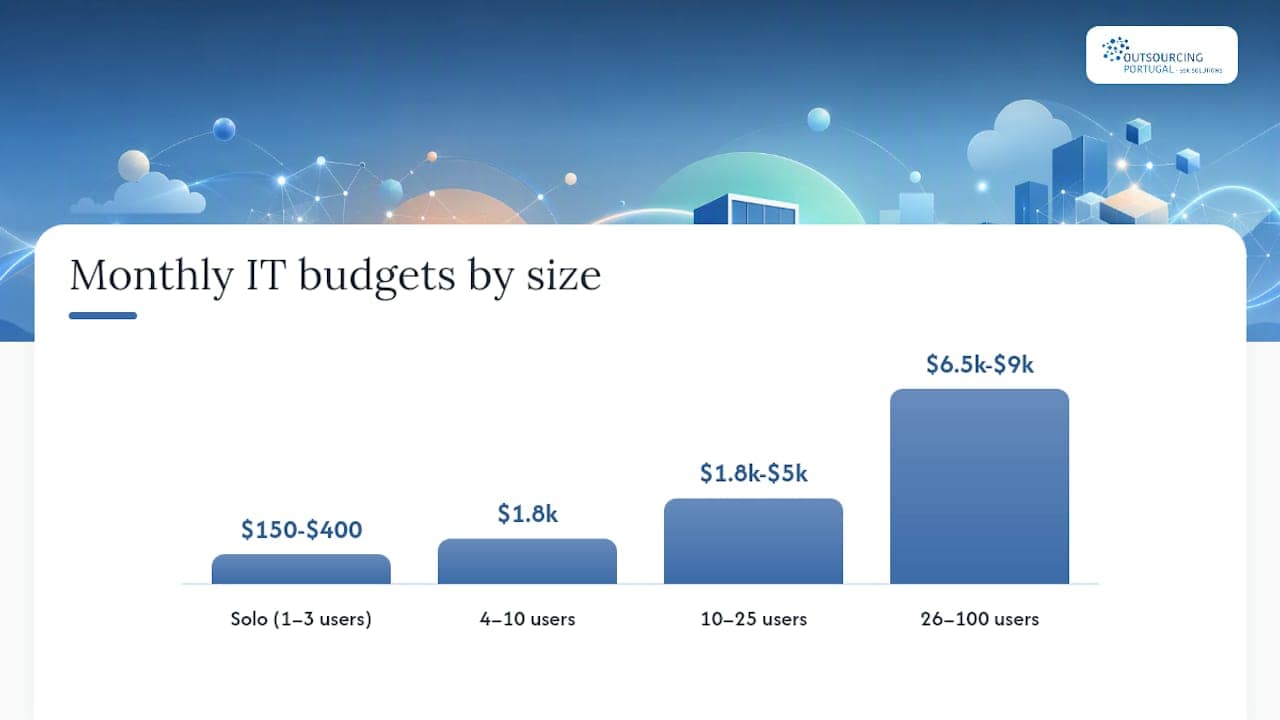
Sample IT budgets and staffing models by business size
The right budget depends on your size, compliance obligations, and risk tolerance. These ranges reflect typical U.S. market pricing and are designed to be adapted, not followed exactly.
| Business Size | Monthly IT Budget | Staffing Model | Key Line Items |
|---|---|---|---|
| Solo / 1–3 users | $150–$400 | Self-managed + break-fix as needed | Microsoft 365 ($22/user), cloud backup ($30–$60), password manager ($5–$10/user) |
| 4–10 users | $1,800 | Basic MSP or part-time contractor | MSP helpdesk ($75–$125/user), endpoint protection, backup management |
| 10–25 users | $1,800–$5,000 | Mid-tier MSP | Full managed services ($100–$150/user), security awareness training, network management |
| 26–50 users | $6,500–$9,000 | MSP plus part-time IT coordinator | Managed services, compliance tooling, MDM, dedicated coordinator ($30–$40K/year part-time) |
| 26–100 users | $6,500–$9,000 | MSP plus full-time IT manager | Full managed services, SIEM, compliance audits, IT manager salary ($75–$100K/year) |
One-time setup costs typically run $500–$5,000 depending on environment complexity, covering network configuration, device enrollment, and policy documentation.
HIPAA-covered entities need a documented risk analysis and a Business Associate Agreement (BAA) with every vendor that touches protected health information.
Remote and hybrid teams add a layer of complexity: VPN or zero-trust network access (ZTNA), device management for home networks, and secure video conferencing configuration. Budget an additional $15–$30/user/month for these controls.
Regional SBDC programs offer staged implementation checklists that can help you sequence these investments over 6–12 months rather than trying to fund everything at once.
If your growth plan includes building a nearshore technical team, Outsourcing-portugal’s EOR and payroll services for Portugal can handle the employment, compliance, and payroll infrastructure so your IT budget stays focused on tools and support rather than entity setup costs.
What most small-business IT advice gets wrong
The standard advice is to “find a good MSP and let them handle it.” That’s not wrong, but it skips the part that actually determines whether the relationship works: you need to understand your own environment well enough to hold a provider accountable.
Most small-business IT failures I’ve seen come down to three patterns. First, the owner assumes the MSP is handling backups, and the MSP assumes the owner configured the backup software. Nobody tested the restore. Second, a business signs a 36-month MSP contract in month two of operation, before they know what they actually need, and spends two years paying for services they don’t use. Third, security gets treated as a one-time purchase rather than an ongoing practice. You buy endpoint protection, check the box, and never revisit it.
The practical stance: prioritize predictability and security over the cheapest quote. A provider charging $90/user/month with a clear SLA, documented security practices, and a tested escalation path is worth more than one charging $60/user/month with vague promises. The delta is usually recovered in the first incident the cheaper provider handles slowly.
Long contracts deserve skepticism. A confident provider doesn’t need to lock you in for three years. Negotiate a 12-month initial term with a 60-day exit clause. If they won’t budge on that, ask why.
Hidden fees are common in this industry. “Remote support” is often included; “on-site visits” are often not. “Backup management” sometimes means they monitor the backup job but don’t test restores. Get the scope of work in writing, line by line.
Sources
These are the most reliable starting points for small-business IT planning, vendor vetting, and cybersecurity basics: