

Any person or company that hires under an employment contract in Portugal must be registered as an employer with Segurança Social. Companies incorporated through Empresa Online usually get this done automatically, with a Social Security Identification Number issued in the same process. Sole traders hiring their first worker don’t get that shortcut. You need to file form RV1001 directly with Segurança Social before that worker’s start date.
TL;DR:
- Automatic employer registration with Segurança Social occurs for companies formed through Empresa Online with pre-approved articles, typically within a few days and is free.
- Sole traders must manually file the RV1001 form before hiring their first worker, as they do not benefit from automatic registration, which delays employer number issuance.
- Most registration failures stem from missing Portuguese NIFs for foreign shareholders or unapproved acceptance-of-office declarations, which require prompt verification within 48 hours.
- Short-term or shift contracts often require worker notification within 24 hours, making timely submissions of RV1009 crucial to avoid penalties.
- Outsourcing Portugal offers Employer of Record services that handle registration, payroll, and compliance for companies without establishing a Portuguese entity, reducing administrative hurdles.
Table of Contents
- How Does Registo De Empregador Portugal Work Step by Step?
- What Documents and IDs Do You Need Before You Start?
- How Long Does Registration Take and What Does It Cost?
- Notifying New Hires: Forms, Deadlines, and Employer Duties
- Sole Traders, Foreign Companies, and Beneficial-Owner Filings
- What Trips Up Even Careful Employers
- Let Outsourcing Portugal Handle the Registration for You
- Sources
- FAQ
How Does Registo De Empregador Portugal Work Step by Step?
The path you take depends on how your company gets incorporated, so pick that route first.
- Choose your incorporation method. Empresa Online 2.0 lets you file everything remotely; Company on the Spot (Empresa na Hora) gets you a same-day certificate at a registry desk with pre-approved articles of association. Custom articles take longer either way.
- Authenticate with a recognized digital ID. Portuguese authentication runs on the Citizen Card, Chave Móvel Digital, or eIDAS for other EU nationals. Foreign representatives without one of these need a Portuguese NIF and, often, a local representative to sign on their behalf.
- Complete the incorporation details. This means selecting your CAE activity code, listing shareholders and managers, and signing the articles of association. Get these details wrong and you’ll be correcting paperwork instead of hiring.
- Let the registry do the handoff. Once incorporation clears, Empresa Online transmits the data electronically to Segurança Social, which is what triggers automatic employer registration for legal entities.
- Confirm the registration actually landed. Check your email for the incorporation confirmation, your access codes, and evidence of NISS issuance. Don’t assume it worked. Log into the Segurança Social portal and verify.
- File RV1001 manually if you’re a sole trader, or if automatic registration didn’t happen. This form goes to Segurança Social directly, either online through the Direct Social Security portal or in person at a local office.
That last step catches more people than it should. Companies formed through non standard routes, or with incomplete representative data, sometimes fall through the automatic process entirely.
What Documents and IDs Do You Need Before You Start?
Gather these before you touch any online form, because a missing NIF is the single most common reason registration stalls:
- Citizen Card or passport for every manager and shareholder, with a certified translation if the document isn’t in Portuguese.
- A Portuguese NIF (tax number) for each individual and corporate entity involved, including foreign shareholders.
- The company’s NIPC, the identifier the Commercial Registry uses to notify Segurança Social and issue the employer’s NISS.
- Signed acceptance-of-office declarations from managers and administrators.
- Beneficial-owner data for your RCBE filing, including full name, date of birth, nationality, and NIF where applicable.
The NISS is the number that actually makes you an employer of record in the system. Companies incorporated through the registry usually get one issued automatically and tied to the NIPC. Sole traders don’t get that automatic step. You have to activate employer status yourself before Segurança Social will issue an employer NISS in your name.
Pro Tip: Request NIFs for foreign shareholders and managers weeks before incorporation, not the day of. This single delay causes more failed automatic registrations than any other document issue.
How Long Does Registration Take and What Does It Cost?
Timing depends entirely on which incorporation route you pick.
- Company on the Spot: same-day certificate, walk out with your NIPC and articles signed.
- Empresa Online with pre-approved articles: typically within a few days for approval.
- Empresa Online with custom articles: generally up to a couple of weeks, sometimes longer if the Registry requests corrections.
On fees, Social Security employer registration itself is free when it happens automatically at incorporation, according to gov.pt’s employer registration service. The incorporation itself is where the money goes: a pre-approved online memorandum runs around €220, while custom articles push the cost to roughly €360 or higher. On-the-spot services publish their own desk pricing separately. Corrections or expedited processing add extra fees on top. Watch for the confirmation email with your access codes and permanent commercial certificate. That’s your proof the process actually closed.
Notifying New Hires: Forms, Deadlines, and Employer Duties
Registering as an employer is only the entry point. Every worker you bring on afterward triggers its own notification obligation, and the clock on some of those is unforgiving.
- Notify Segurança Social of the admission. Most standard contracts follow the normal reporting cycle, but certain short-term or shift-based contracts require notification within 24 hours of the worker starting. Miss that window and you’re looking at administrative friction, sometimes penalties.
- Use the RV1009 form for worker admissions. It captures the worker’s NISS, start date, and contract type, and it’s submitted through the Segurança Social Direta portal. Filing is free.
- Use RV1011 for changes to your own employer record. This covers starting, altering, or ending your registered activity as an employer, separate from individual worker notifications.
- Stay current on contribution payments. Employer Social Security contributions follow a monthly cycle, and rates vary by contract type and sector, so confirm your specific obligation rather than assuming a flat figure applies.
- If a notification gets rejected, don’t guess at the fix. Check that the worker’s NISS is valid and active first. That’s the most common cause. If the portal keeps rejecting a valid submission, escalate to your local Segurança Social office rather than resubmitting blind.
Companies managing this internally sometimes underestimate how tight the 24 hour window is for short-term staff. A compliance checklist for hiring in Portugal is worth keeping on hand if you’re onboarding several people at once.
Sole Traders, Foreign Companies, and Beneficial-Owner Filings
Not everyone fits the standard incorporation flow, and the exceptions matter.
- Sole traders hiring their first employee must activate employer status directly with Segurança Social and file RV1001 before the worker’s start date, since there’s no automatic trigger the way there is for incorporated companies.
- Foreign companies need a Portuguese NIF and NIPC before anything else moves. Without it, the automatic registration flow simply has nothing to attach to. A local tax representative is often required, and any foreign-language documents need certified Portuguese translations.
- Managers and administrators each need individual registration, and their acceptance-of-office declarations must be signed before the Registry will process incorporation.
- RCBE filings for beneficial owners are due within 30 days of incorporation. Miss it and you’re dealing with a compliance gap on top of an incomplete employer record.
- Keep powers of attorney and representative documents ready in advance if a director won’t be physically present for signing.
What Trips Up Even Careful Employers
Most failed automatic registrations trace back to one of two things: a missing NIF for a foreign representative, or an acceptance-of-office declaration that never got signed. Neither looks like a big deal until Segurança Social’s system has nothing to match against, and then you’re stuck manually filing what should have been automatic.
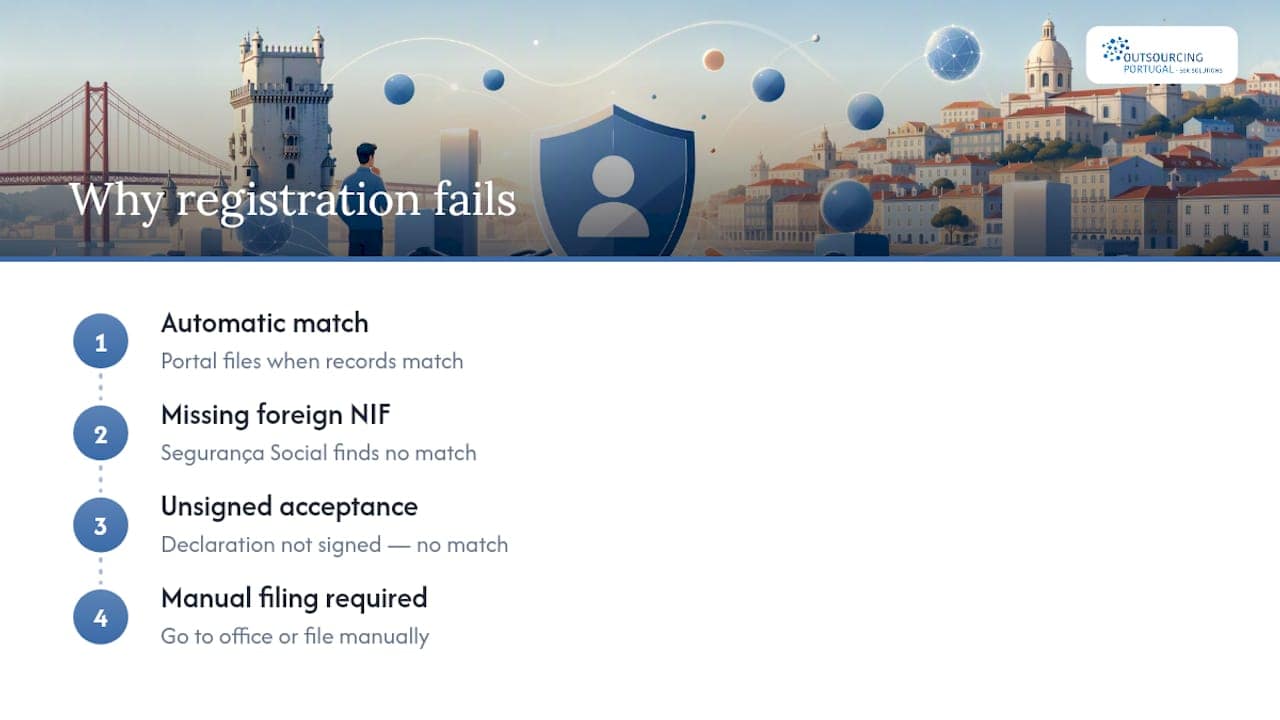
Run a quick check within 48 hours of incorporation. Confirm the email with your company access codes arrived, verify your NISS actually issued, and don’t let the RCBE deadline slip past 30 days. If you’re operating across multiple sites, double check the establishment code is correctly assigned. This is one of the more overlooked details, and it affects how worker admissions get routed.
Most of this is solvable through the online portals. But once you’re dealing with a foreign shareholder without a Portuguese NIF, or a registration that’s stuck for reasons the portal won’t explain, that’s when it’s worth walking into a district Social Security office instead of refreshing a webpage. Some providers handle this exact friction for foreign companies daily, and it’s rarely the paperwork itself that’s hard. It’s knowing which office solves which specific problem.
— Paulo
Let Outsourcing Portugal Handle the Registration for You
Some services remove the registration bottleneck entirely for foreign businesses that don’t have a Portuguese entity yet. Instead of chasing NIFs, signing acceptance declarations, and hoping your automatic Segurança Social registration goes through cleanly, you can work with a partner who has local tax representation and administrative relationships to get it right the first time.
Through Employer of Record services, you can hire in Portugal without incorporating a company at all. Outsourcing Portugal manages worker admission notifications, payroll setup, and ongoing Segurança Social reporting on your behalf. If you’re weighing whether to incorporate directly or hire through an EOR, the EOR compliance and hiring speed guide breaks down the tradeoffs.
To get started, you’ll typically need to provide passport copies for the individuals being hired, confirmation of the role and contract terms, and your company’s existing tax registration abroad. Visit the Outsourcing Portugal hiring page to start a conversation about your specific timeline.
Sources
FAQ
How Much Does It Cost to Register a Company in Portugal?
Incorporation with pre-approved articles through Empresa Online costs around €220, while custom articles typically run about €360 or more. Social Security employer registration itself is free when it happens automatically.
How Can I Register a Company in Portugal?
You can incorporate through Empresa Online for remote filing or Company on the Spot for same-day, in-person incorporation with pre-approved articles. Both require valid IDs, Portuguese NIFs for shareholders and managers, and a chosen CAE activity code.
How Should a Company Start Activity With Social Security?
Companies incorporated through the commercial registry are automatically registered as employers with Segurança Social and issued a NISS. Sole traders must file RV1001 directly before hiring their first worker.
How Do I Register a Worker With Social Security?
Submit the RV1009 form through the Segurança Social Direta portal with the worker’s NISS, start date, and contract type. Some short-term or shift-based contracts require this within 24 hours of the start date.
What Happens If I Miss the Registration or Notification Deadline?
Late or missing employer registration and worker notifications can trigger administrative penalties and complicate payroll start dates. Businesses that need to move quickly without navigating these deadlines themselves often turn to an Employer of Record to manage compliance directly.