
TL;DR:
- Inefficient HR support costs organizations more than anticipated by causing delays and mishandled sensitive cases. Implementing a structured, tiered support model with clear workflows, technology, and ongoing refinement builds trust and scale. Proper ownership, documentation, and data-driven adjustments prevent system collapse as organizations grow.
Inefficient HR support quietly costs organizations more than most leaders realize. Employees wait days for answers on basic policy questions, sensitive complaints get mishandled because no one owns the process, and HR specialists burn time on routine queries they never should have seen. A structured hr support step by step approach fixes all of this. This guide gives HR professionals and business leaders a precise framework for building tiered, scalable HR support from the ground up, covering foundational setup, process design, sensitive case handling, and technology selection.
Table of Contents
- Key Takeaways
- HR support step by step: laying the foundation
- Building the step-by-step HR support process
- Handling sensitive cases within HR support
- Technology that powers modern HR support
- My take: what actually breaks HR support
- Build better HR support with Outsourcing-portugal
- FAQ
Key Takeaways
| Point | Details |
|---|---|
| Build before you deploy | Gather data on common HR request types and define support tiers before touching any technology. |
| Tier your support model | Route low-risk questions to self-service and reserve specialists for high-complexity, high-risk issues. |
| Treat complaints as trust moments | The first response to a sensitive complaint sets the tone for the entire investigation process. |
| Technology enables, culture decides | Ticketing systems and AI tools only work when workflows and ownership are already clearly defined. |
| Measure first response time | Tracking SLA adherence separates genuinely effective HR support from fast-looking but incomplete answers. |
HR support step by step: laying the foundation
Before you build anything, you need a clear picture of what you are actually dealing with. Pull at least three months of HR queries from your inboxes, Slack threads, and any existing ticket logs. Categorize them by type: policy questions, payroll inquiries, onboarding requests, leave management, performance concerns, and employee relations issues. This data tells you exactly where your current process breaks and where volume concentrates.
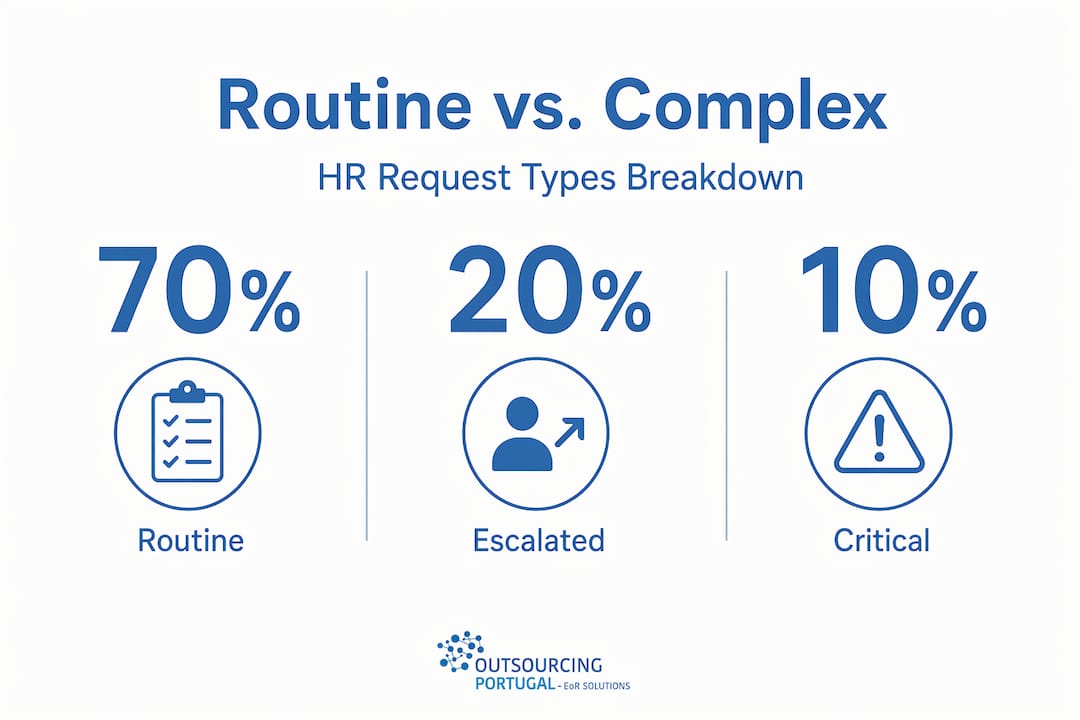
Most organizations discover the same pattern: 60 to 70 percent of HR queries are routine and repeatable. That means the majority of what lands in a specialist’s inbox could be handled through self-service or a general HR contact.
Defining your support tiers
A tiered service delivery model divides HR questions into three levels based on risk and complexity.
| Tier | Who handles it | Request types |
|---|---|---|
| Tier 0: Self-service | Employee, via portal or knowledge base | Policy lookups, PTO balance checks, form downloads |
| Tier 1: General HR team | HR generalist or coordinator | Onboarding questions, basic payroll queries, leave requests |
| Tier 2: Senior HR specialists | Senior HR business partner or legal | Investigations, complex ER cases, disciplinary actions |
Once you have your tiers defined, identify the technology platforms you need. At minimum, you need a ticketing system for request tracking, a knowledge base for self-service content, and a communication channel employees can access without confusion. You also need to define a single “front door,” meaning one clear entry point where all HR requests come in, whether that is a web form, an email address, or a chat interface.
Pro Tip: Before selecting any tool, map out your most common 20 request types and check whether each one can be answered through self-service. If more than half can, you have a strong case for investing in a knowledge base before anything else.
Building the step-by-step HR support process
With your foundation in place, you can design and deploy the actual HR support workflow. Here is a practical eight-step process.
-
Analyze and classify current requests. Use your three months of data to build a master list of request types. Tag each with volume, average resolution time, and current handler.
-
Map each request to a support tier. Match request types to Tier 0, 1, or 2 based on risk and complexity. A policy question about vacation accrual belongs at Tier 0. A complaint about a manager’s behavior belongs at Tier 2.
-
Build routing rules and escalation paths. Define exactly what triggers escalation from one tier to the next. A Tier 1 request that involves allegations of misconduct, legal exposure, or repeated unresolved issues should automatically escalate to Tier 2.
-
Set service level agreements. Establish response time targets for each tier. A common starting framework: Tier 0 is immediate, Tier 1 responds within four business hours, and Tier 2 acknowledges within 24 hours with a resolution timeline communicated to the employee.
-
Build or integrate your support platform. HR ticketing systems categorize requests, automate workflows, and maintain SLA compliance. Configure your routing rules directly into the platform so tickets reach the right person without manual triage.
-
Pilot with one HR domain. Start with onboarding or leave management. These are high-volume, relatively low-risk functions that let you test the system without exposing the organization to sensitive-case risk during setup.
-
Collect data and refine. After four to six weeks of piloting, review your ticket data. Where are escalations happening that should not? Where are employees resubmitting because their issue was not resolved? Use that feedback to tighten routing rules and update knowledge base articles.
-
Scale across other HR functions. Once the pilot domain runs cleanly, roll out the same structure to payroll, performance management, and employee relations. Structured ticketing at scale becomes non-negotiable past roughly 50 to 200 employees.
Pro Tip: Do not launch your knowledge base with 100 articles. Start with the 10 questions your team answers most often. A short, accurate knowledge base beats a large, outdated one every time.
Pairing this HR support workflow with a well-documented onboarding process also reduces first-week confusion for new hires significantly.

Handling sensitive cases within HR support
Sensitive employee relations cases require a separate, more careful process inside your HR support structure. A complaint about harassment or discrimination is not a ticket to be routed and resolved in four hours. It is a trust-building moment, and how you handle the first five minutes shapes everything that follows.
The issue management lifecycle includes identification, documentation, severity assessment, investigation, and resolution. Applied to HR support, that translates into a specific sequence.
-
Acknowledge immediately. The employee who reports a complaint needs to know it was received, taken seriously, and that someone owns it. Send a written acknowledgment within two hours.
-
Triage for severity. Assess whether the complaint requires formal investigation. Early triage decides investigation necessity and keeps the process transparent from the start. Not every complaint requires a full investigation, but every complaint requires a documented decision about why or why not.
-
Assign ownership and build an investigation plan. Name a single investigator. Define the scope, likely witnesses, timeline, and documentation requirements before the first interview takes place.
-
Conduct the investigation with consistency. Ask the same structured questions to each witness. Document every conversation. Maintain confidentiality by limiting information sharing to those with a genuine need to know.
-
Maintain communication throughout. Transparent communication during investigations reduces anxiety and speculation. You do not need to share findings in progress, but you should tell the complainant that the investigation is active and give realistic timelines.
-
Deliver fair outcomes and close the loop. Share the outcome with all relevant parties in writing. Even when you cannot disclose all details, the person who reported the issue deserves to know the process is complete and that action was taken.
-
Monitor for retaliation and extract learning. Set a 90-day follow-up checkpoint. Check in with the complainant. Clear documentation and confidentiality throughout the process also protect the organization legally if the case is later challenged.
An HR support system that handles routine queries well but fumbles sensitive cases destroys more trust than having no system at all.
Pro Tip: Pre-triage incoming HR requests by risk lane before assigning ownership. This protects specialists from being pulled into routine work and keeps your most experienced people focused on cases that actually need them.
Technology that powers modern HR support
Technology does not replace a well-designed HR support process. It amplifies it. If your routing rules are unclear, a ticketing system just automates the wrong behavior faster. Get the process right first, then pick your tools.
That said, the right technology stack makes a real difference at scale. Here is what to look for:
- Omnichannel intake. Employees should be able to submit requests through a web portal, email, or chat without changing the outcome. All submissions should land in the same ticketing queue.
- Automated routing. HR help desks combine ticketing with automation so queries reach the correct team without manual sorting.
- AI-assisted triage. Newer platforms use intent detection to read incoming requests and suggest routing, draft initial replies, or flag potential sensitive-case indicators before a human reviews the ticket.
- Confidentiality controls. Sensitive tickets related to investigations or complaints need visibility restrictions so only authorized personnel can see the content.
- SLA monitoring. Your ticketing platform should alert team members when a ticket is approaching its response deadline, not after it has already been missed.
| Platform type | Best for | Key feature |
|---|---|---|
| Dedicated HR help desk | Mid to large organizations | Built-in HR workflows, compliance logging |
| IT-adapted ticketing | Tech-forward teams | Flexible configuration, omnichannel intake |
| Knowledge base tools | Self-service reduction | Article analytics, gap identification |
A well-maintained knowledge base decreases repetitive HR questions, but it needs continual updates based on actual ticket trends. Review your knowledge base articles quarterly. If a topic keeps generating tickets, the article either does not exist or does not answer the actual question employees are asking.
Pro Tip: Tracking first response time and SLA compliance is critical to distinguish between quick answers and genuinely effective HR support. Speed without resolution is not support.
For companies building nearshore teams in Portugal, Outsourcing-portugal provides a useful international HR management guide that covers how structured HR processes translate across borders.
My take: what actually breaks HR support
I have seen enough HR support builds, from 30-person startups to 2,000-person operations, to know where things consistently go wrong. The problem is almost never the technology. It is unclear ownership and workflows that live in people’s heads instead of documented systems.
In my experience, the most common failure pattern is this: a smart HR team builds informal processes that work well when the same three people are handling everything. Then the company hits 150 employees, someone goes on leave, and the whole system collapses because nobody else knows the unwritten rules. That is a culture and documentation problem, not a software problem.
The other mistake I see constantly is overloading senior HR specialists with routine queries because nobody built the Tier 0 and Tier 1 layers properly. These are your most expensive, most experienced people spending half their day answering vacation policy questions. Technology is a tool, not a substitute for culture and clear workflows. Getting those right first changes everything.
What I have found actually works is treating your HR support system as a living product, not a one-time project. Review your SLAs quarterly. Update your knowledge base based on ticket data. Audit your escalation paths every six months. The organizations that get this right are the ones that measure consistently and iterate without waiting for something to break.
— Paulo
Build better HR support with Outsourcing-portugal

If you are building or scaling an HR support function and want external expertise to back you up, Outsourcing-portugal offers fully integrated HR services designed for international organizations operating in Portugal. From employer of record and payroll services to employee relations support and compliance management, the team brings the structure and legal knowledge that makes a tiered HR support system actually work in practice. Whether you are setting up a nearshore team for the first time or trying to reduce internal HR burden at scale, Outsourcing-portugal has the operational depth to support you. Explore the full range of employment and HR outsourcing services available for Portugal-based teams.
FAQ
What does a tiered HR support model look like?
A tiered HR support model routes self-service questions to a knowledge base, general queries to an HR coordinator, and complex or sensitive cases to senior HR specialists. Each tier has defined request types, response times, and escalation criteria.
How do you build an HR support workflow from scratch?
Start by analyzing three months of HR requests to identify volume and type, then map each request category to a support tier, define routing rules, set SLAs, and pilot the system in one HR domain before scaling.
When does a complaint require a formal HR investigation?
Any complaint alleging harassment, discrimination, misconduct, or legal exposure should be triaged for formal investigation. A documented triage decision, regardless of the outcome, protects both the employee and the organization.
What technology do you need for effective HR support?
You need a ticketing system with automated routing, a knowledge base for self-service, and SLA monitoring capabilities. Larger organizations benefit from AI-assisted triage that detects request intent and flags sensitive cases before human review.
How do you measure whether your HR support system is working?
Track first response time, SLA adherence rate, ticket resolution time, and self-service deflection rate. If escalations are increasing without a corresponding rise in headcount or complexity, your Tier 0 and Tier 1 layers need attention.